
We have shipped every WordPress and WooCommerce build on Kinsta since 2020. Not because a sales deck convinced us, but because we kept watching cheap hosting fail the same way: a traffic spike on a Tuesday, a 502 that nobody catches for six hours, a support ticket that gets answered by someone reading a script. We got tired of being the studio that had to apologize for a host we didn’t pick. So we picked one, and we have been a Kinsta Agency Partner for years now. It is in our footer for a reason.
This is not a sponsored post. We pay Kinsta like everyone else. What follows is the practitioner’s verdict: what you actually get, the lift we see on real migrations, what it costs against the hidden cost of cheap hosting, and the three situations where we tell clients to host somewhere else.
What you actually get for the money
Kinsta runs on Google Cloud’s premium compute. New sites land on C2 or C3D machines, which means modern CPUs and fast memory rather than the oversold shared boxes most budget hosts pack hundreds of sites onto. That single fact explains most of the performance difference. You are not fighting forty other tenants for the same vCPU.
The rest of the stack is the part people underrate:
- Server-level page caching plus an Nginx-based edge cache and a Cloudflare-backed CDN with 300-plus locations, included. No bolting on a separate CDN account, no guessing at cache headers.
- Daily automatic backups kept off-site, plus the ability to take a manual snapshot before you touch anything risky. Restore is one click.
- A real staging environment per site, one click to create, one click to push live. Not a clone you maintain by hand on a subdomain.
- Container-level isolation. One site getting hammered does not starve the others. On cheap shared hosting, a neighbor’s bad plugin is your downtime.
- Support that actually runs WordPress. You can say “the object cache isn’t invalidating after a Woo order” and get an answer, not a link to a knowledge base article about clearing your browser cache.
That last point is the one we value most after nine years of this. When something breaks at 2am for a US client and we are awake in India, we want the host’s engineer to understand PHP workers, MySQL slow queries, and how WooCommerce hits the database. Kinsta’s support does. We have opened tickets mid-incident and had a human dig into the actual logs with us.
The lift we see on real client migrations
Numbers matter more than adjectives, so here is what we typically measure when we move a site off discount shared hosting or a neglected VPS onto Kinsta.
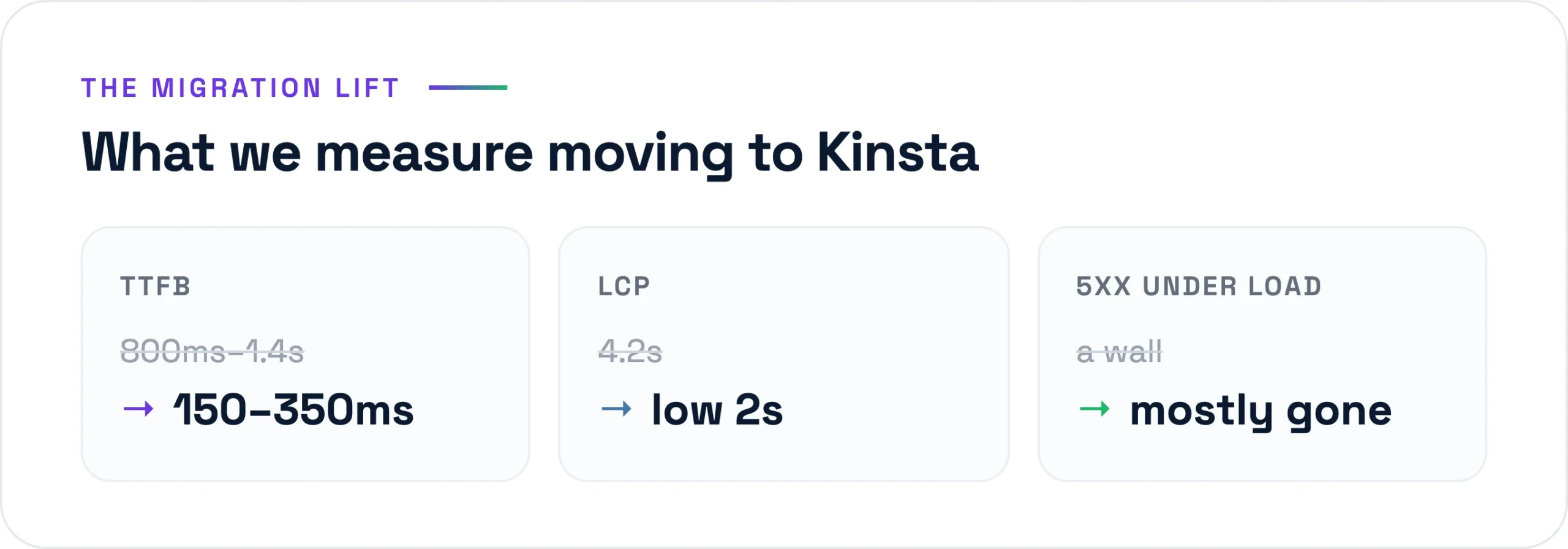
TTFB is the clearest tell. Sites that were sitting at 800ms to 1.4s of server response time on shared hosting routinely drop to 150 to 350ms once they are on Kinsta with server-level caching doing its job. That is not a tuning trick. It is the cache layer plus faster compute plus a CDN edge that was already there.
LCP follows. We have taken WooCommerce category pages from a 4-second-plus Largest Contentful Paint into the 1.8 to 2.4s range, comfortably inside Google’s 2.5s “good” threshold, with no change to the theme. Same Bricks build, same images, better infrastructure underneath. When we then layer WP Rocket for asset optimization on top of the server cache, the gap widens further.
The one that saves client relationships is error rate under load. On a shared host, a product launch or an email blast to a Klaviyo list of 40,000 people will throw 5xx errors the moment PHP workers and database connections run out. We have watched it happen in real time and been unable to do anything except wait. On Kinsta, the same traffic pattern hits a site that can actually scale its workers, and the 502s and 504s mostly disappear. Fewer angry “the site is down” emails during the exact window when the client is trying to make money.
The all-in cost reality
Here is the honest math. For the business sites and stores we run, Kinsta lands somewhere between roughly US$35 and US$200 a month all-in, depending on traffic and how many sites share a plan. A brochure site for a US consultancy might sit at the lower end of a Starter or Pro plan. A WooCommerce store doing real volume sits on a Business tier around US$115 a month. That is the whole bill: compute, caching, CDN, backups, staging, SSL, support.
Cheap hosting looks like it wins this comparison. US$5 a month, sometimes US$3 with a coupon. The cost is just hidden, and it moves off the invoice and onto your time and your revenue:
- Downtime during your highest-traffic moments, which is precisely when it costs the most.
- You or your developer doing manual backups, manual security patching, manual cache config, all billable or all your evenings.
- Slow TTFB quietly suppressing conversion and search rankings every single day.
- A hack on an oversold shared server, then a cleanup bill that dwarfs a year of good hosting.
- Support that cannot help with the actual WordPress problem, so the outage lasts longer.
For a brand doing six or seven figures online, arguing about a US$100-a-month hosting difference is arguing about the wrong number. An hour of downtime on a store doing US$100,000 a month is more than a year of the hosting upgrade. We have run the comparison with clients on a whiteboard, and it ends the conversation every time. This is the same logic behind how we scope the rest of a build: spend where downtime and slowness cost real money, save where they don’t.
Where Kinsta is the wrong answer
This is the part a sponsored post would skip. Kinsta is not the right call for every project, and we say so before we take the work.
A tiny brochure site with genuinely no budget
If a local plumber needs a five-page site, gets 200 visitors a month, and the entire project budget is tight, asking them to carry a US$35-a-month hosting line forever is the wrong advice. We will either build them something lighter or be honest that a managed-WordPress price floor does not fit their reality. Premium hosting earns its keep on sites where speed and uptime convert into money. On a site that barely gets traffic, it is overhead with no payoff.
A static site that belongs on Cloudflare Pages
Not every site needs WordPress. If the content is essentially fixed, no logins, no checkout, no dynamic queries, a static build deployed to Cloudflare Pages will be faster and cheaper than anything running PHP and MySQL. It serves from the edge for free or close to it, and there is no server to keep patched. We have shipped sites this way on purpose. Putting a static brochure on managed WordPress just to use WordPress is paying for a database nobody queries.
A client who needs email hosting bundled in
Kinsta does not do email hosting. No mailboxes, no IMAP, no @yourdomain inboxes. That is deliberate, and we think it is correct, because mail and web are different jobs that fail differently. But it surprises clients coming from a cPanel host where everything was in one panel. If a small business genuinely wants one login for their website and their email, and does not want to run Google Workspace or Microsoft 365 separately, a managed-WordPress-only host adds a step they did not expect. We solve it by pairing Kinsta with Workspace, but you have to set that expectation up front or it feels like something is missing.
How we actually decide on a project
The rule we use is simple. If the site makes money, or its uptime and speed affect a real business outcome, it goes on Kinsta. WooCommerce stores, lead-generating sites for service businesses, membership sites, anything where a slow page or a Tuesday outage costs the client more than the hosting does. That covers the large majority of what we build, which is why nearly every project in our portfolio runs on it.
If the site is essentially static, or the budget genuinely cannot support the floor, or email-in-one-panel is a hard requirement, we route it elsewhere and tell the client why. That honesty is the point. We are not loyal to a host. We are loyal to the build working at 2am when nobody is watching.
The verdict after six years
We have hosted client sites on Kinsta since 2020 and we have not found a reason to move the work that belongs there. The performance is real and measurable. The backups and staging have saved us from our own mistakes more than once. The support understands the stack, which during an incident is worth more than any feature list. And the cost, set against what cheap hosting actually costs once you count the downtime and the cleanup, is not close.
It is not magic. It will not rescue a bad build, it will not host your email, and it is overkill for a static five-pager. Know those edges and the decision gets easy. For the sites that earn their keep, premium managed hosting is the cheapest line item we put on the invoice. If you are weighing a migration or a new build and want a straight answer on whether your site belongs there, send us a brief.