To display COAs (certificates of analysis) on WooCommerce product pages, you have three options. Link the lab PDF from the product, install a COA plugin that ties each certificate to a batch and a size, or build a custom system. Linking is free and breaks when the second batch arrives. A plugin handles batches, sizes and history. A custom build is for real gating, lab imports or thousands of lots.
This is for store operators: mostly research peptide stores, plus supplement and CBD catalogs. They share one problem. A new lot lands, each size needs its own certificate, and someone asks whether the COA on the page is current.
| Method | Fits | Cost | Breaks when |
|---|---|---|---|
| Linked PDF | A handful of products, one batch each | Free | The second batch arrives, or you sell a variable product |
| COA plugin | Batches, sizes and batch history | Free, or a paid subscription | You need a real gate, lab or inventory integrations, or thousands of lots |
| Custom build | Scale, a real gate, lab or inventory imports, migrations | Fixed price, scoped in writing | The spec is vague, so write it down first |
What a certificate of analysis (COA) is
- Certificate of analysis (COA). A document from a testing lab that reports its results for one specific batch of a product.
- Batch or lot. One production run, with its own COA.
- Variation-level (per-variation) COA. A certificate attached to one size or variation of a variable product, not the parent product.
One batch, one certificate. Everything else in a COA setup exists to keep that pairing correct as stock rotates.
Method 1: a PDF linked from the product
Upload the lab PDF to the Media Library and link it from the product description, or from a custom tab added with the woocommerce_product_tabs filter or a tab plugin.
It is fine for ten products with one batch each, but it breaks in three places.
- New lots. Every restock means finding and replacing every link by hand. Miss one and the page shows last spring’s batch.
- Variations. WooCommerce has no per-variation document field, only each variation’s description text.
- Stale and missing files. Media Library files have public URLs and stay live after you unlink them. Nothing tells you which products have no COA at all.
If you stay manual, name files consistently (product, size, batch, date) and keep a spreadsheet of which file belongs to which lot. That spreadsheet is also the first sign you have outgrown the method.
Method 2: a WooCommerce COA plugin (options compared)
A plugin stores COAs as data instead of links in text, so a new batch is a new record, not a find-and-replace job. The options differ more than their names suggest: certificate hosts, a batch inventory tool, and a hosted service with a WooCommerce connector.
| Feature | Manual PDF | Certificate of Analysis (WPRobo) | COA Vault (built by Beenacle) | coanalysis.io | Product Batch Numbers (WP Overnight) |
|---|---|---|---|---|---|
| Type | Media Library file linked from the product | WooCommerce.com extension | Plugin with its own tables | Hosted service with a WooCommerce plugin | Batch and expiry inventory |
| Where it shows | Description or a custom tab | Product tab or below the summary; block or shortcode | Product summary, above add-to-cart; shortcode | Embeddable widgets | Batch number or next batch’s expiry, by shortcode |
| COA per variation | Via each variation’s description | Yes, per its product listing | Yes | Not mentioned | No files; batch numbers per variation |
| Batch record | Typed by hand | Yes, the main identifier | Yes, one per record | Yes, with expiry dates | Yes, with expiry dates |
| Batch linked to orders | No | Yes | No | Not mentioned | Yes, first in, first out |
| Shopper QR or batch lookup | Only a QR you make | Yes, both | No; links to the lab’s page | Not mentioned | Not mentioned |
| Login gating | No; public file URLs | None described | No; public by design | Not mentioned | Not mentioned |
| Bulk import | No | CSV import and export | No CSV; REST API | CSV and ZIP | Via WP All Import, with a free add-on on request |
| Price | Free | Annual subscription | Free, GPL-2.0-or-later | Token-based subscription, 14-day trial | From €39 a year |
- Certificate of Analysis by WPRobo. It offers an optional disclaimer, age check and checkout acknowledgement.
- coanalysis.io. Its roles cover your team’s accounts; its site does not mention controlling which shoppers can see certificates.
Also out there: Product Documents by SkyVerge, a general file attacher whose documentation says it shows the same document set for every variation. TraceBatch, free on WordPress.org, has a listing that describes QR code labels linked to a traceability certificate.
Sources: WPRobo’s documentation and product listing, WP Overnight’s product page and documentation, coanalysis.io, SkyVerge’s Product Documents guide and TraceBatch on WordPress.org.
If you need order-level batch records and a public verify-by-batch page, the documentation for Certificate of Analysis by WPRobo describes both; COA Vault has neither.
How to show a COA per variation and per batch in WooCommerce
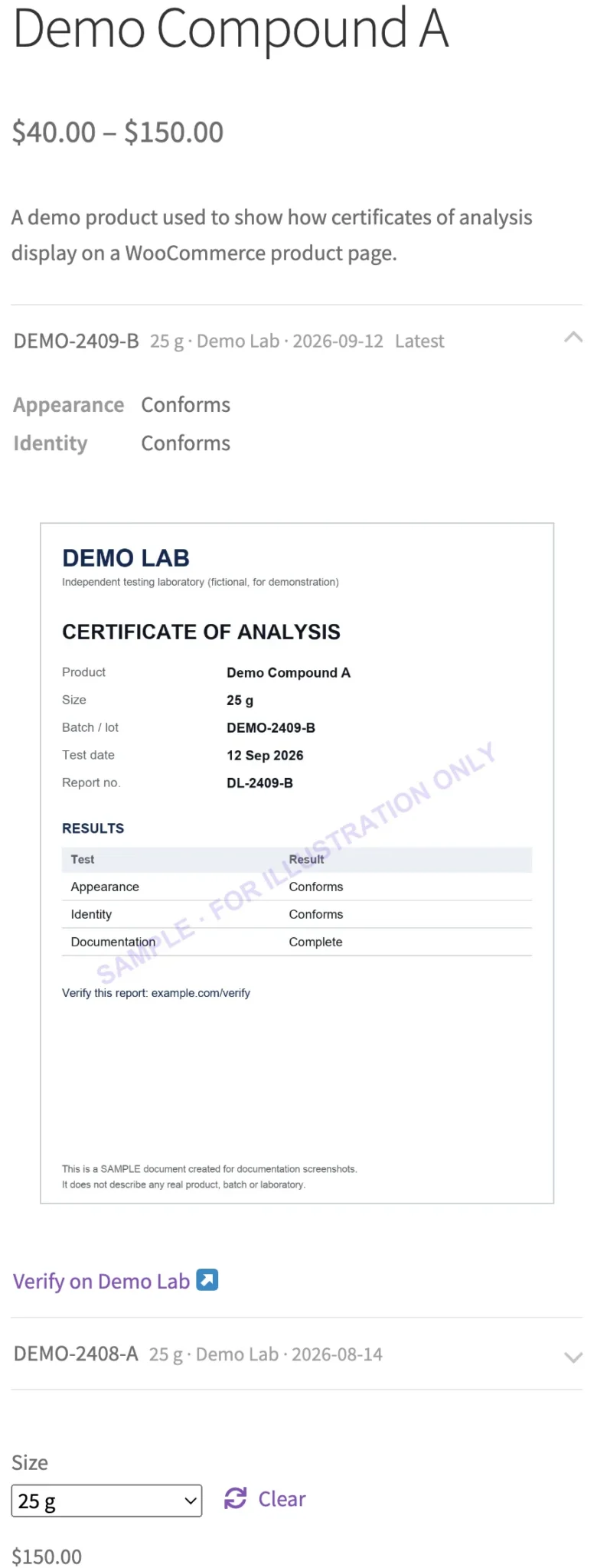
To show a different COA for each size, use a tool that attaches certificates to a variation, not just the parent product. COA Vault does, and the product listing for Certificate of Analysis by WPRobo says you can link a different batch to each variation. Product Batch Numbers by WP Overnight tracks batch numbers per variation but does not host certificate files. Manually, the only place is each variation’s description; either way, test by switching sizes on the live page.
One certificate is one record: a batch number, a lab, a test date and the file. Attach each record to the variation or size it covers, and make the batch number match the label exactly. When a new lot lands, add a new record, make sure it is the one shown as current, and keep the older records so older lots stay traceable.

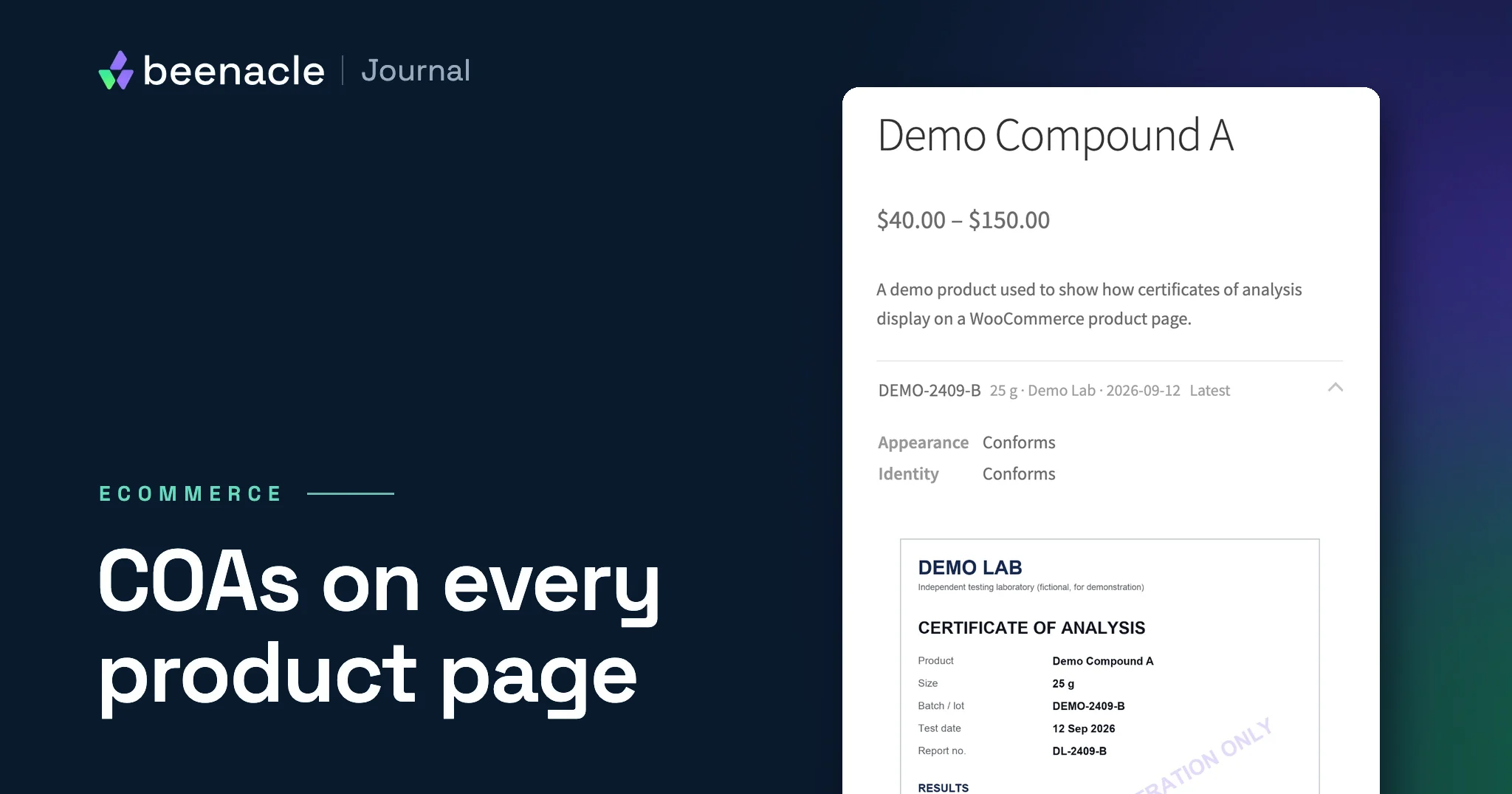
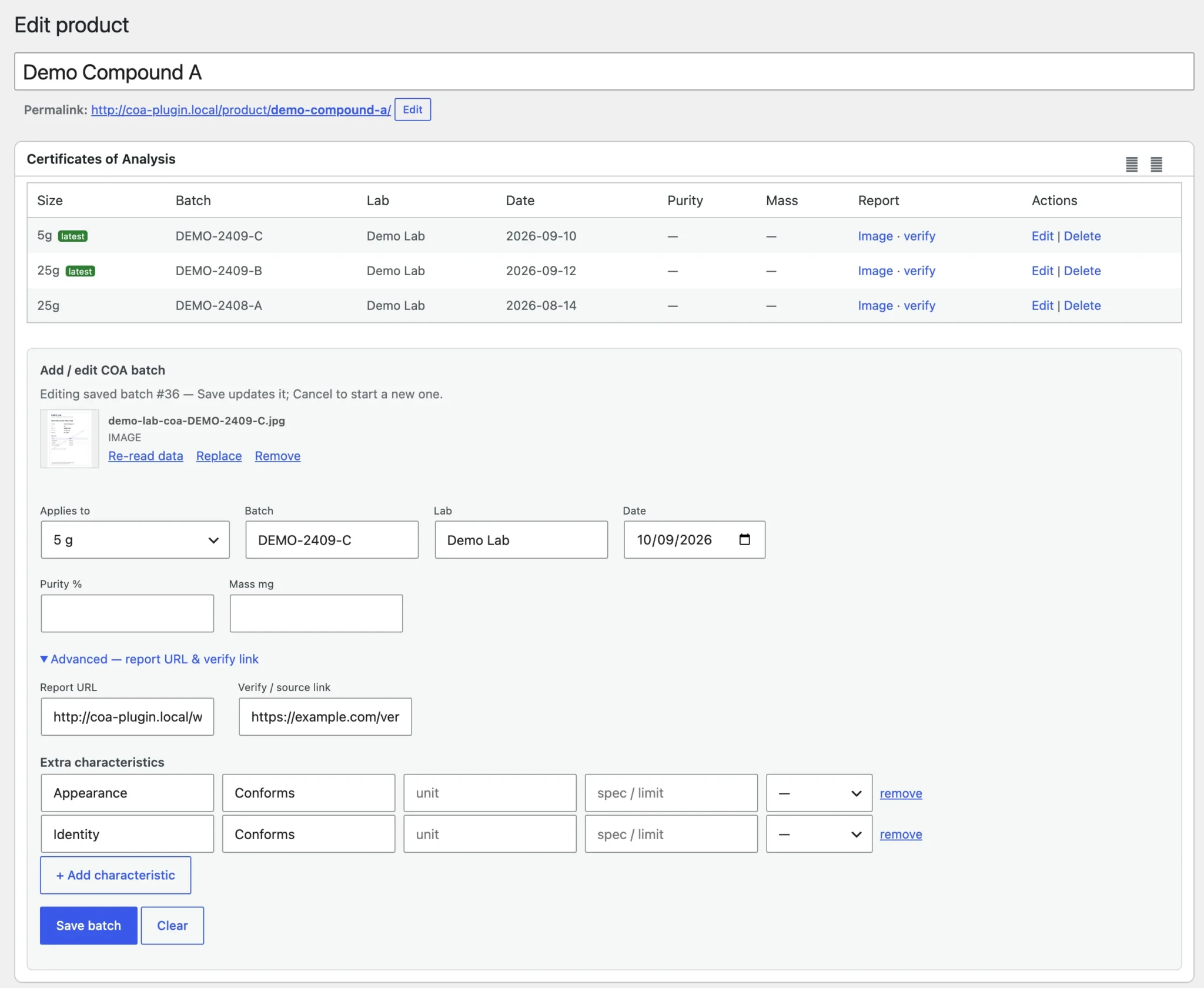
In COA Vault, set a batch’s “Applies to” field to the variation. For each size, the batch with the newest test date is tagged Latest, so the date has to be right; check every date, including any the optional AI reading filled in.
Method 3: a custom COA system
Plugins, ours included, are built for the common case, and most stores should start with one. These are the cases where a custom COA system earns its cost.
- Large catalogs with many lots. Hundreds of products, several sizes each, a new lot every few weeks. At that scale the job is a data model and an intake workflow, not a display widget: bulk uploads and an audit trail of who added which certificate, when, and what it replaced.
- Lots tracked per size and per order. You need to know which batch shipped in which order, and the product page, the packing slip and the label, with its QR code and lookup page, all have to agree.
- COAs pulled from lab portals or inventory systems, landing on the right variation without anyone re-uploading PDFs.
- Account approval and a real gate. Approved accounts, protected file storage, and an API that answers only for approved accounts.
- Moving COAs during a migration, with every certificate remapped and every old URL covered by a WordPress migration redirect map.
If two or more of these describe your store, price a build before you pay for workarounds.
COA Vault is free, and we set it up as standard on every store we build that shows COAs. On a live store, we can move your existing certificates into it and design the panel to match your site. That is quoted as a fixed price before any work starts. On a new store, batch-linked COAs come with our six-week High-Risk Store Launch, $12,000 fixed, and custom builds that need lot-level inventory start at $15,000.
Not sure which side of the line you are on? Send us three numbers: products, sizes per product, and new lots a month. We reply within one business day and tell you whether a plugin is enough, ours or someone else’s, or whether you need a build. Send us the three numbers.
FLAGSHIP · FIXED SCOPE
High-Risk Store Launch, $12,000 fixed
For peptide, supplement, and compounding brands. Custom design, your catalog and customers moved over, one high-risk processor plus a backup route, an age gate, research-use notices, and batch-linked COAs, with the first 30 days of High-Risk Store Care. Ready to launch in six weeks. Approval and its timing are always the processor’s. Hosting is billed by your host, never by us.
How to set up a COA plugin: COA Vault as the example
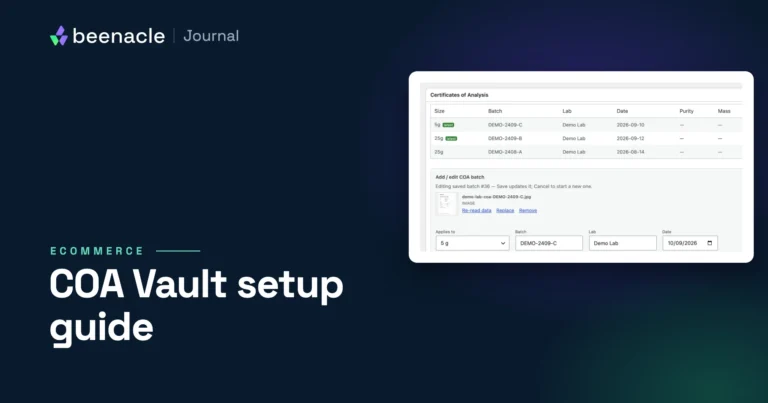
COA Vault needs PHP 8.1+, WordPress 6.4+ and an active WooCommerce 8.0+. The full walkthrough, with every setting and screenshot, is in our COA Vault setup guide.
1. Install from the GitHub release
COA Vault is not on WordPress.org. Download coa-vault.zip from the latest release on GitHub, then go to Plugins → Add Plugin → Upload Plugin and activate. Later updates appear in Dashboard → Updates.
2. Add a COA to a product
Open a product and find the Certificates of Analysis box. Drag a certificate (JPG, PNG, WEBP, GIF or PDF) onto the drop zone, or use Upload or Media Library.
Fill in the batch form: Applies to (the whole product or one variation), Batch, Lab, Date and the headline results. Pick a certificate date order in COA → Settings only if all your labs agree: 06/04/2026 is June 4 to a US lab and 6 April to a UK one. Nothing is saved until you click Save batch. Every dropped file lands in the Media Library, even if you never save.
3. Optional: let AI read the certificate
With your own Anthropic API key, the plugin pre-fills the batch form from each certificate for you to review. Once a key is set it runs on every certificate you add, with no per-certificate off switch. The whole file goes to Anthropic, including anything printed on it, such as your store’s name or your account number with the lab. By our estimate it costs about a cent a page. Put the key in wp-config.php as COA_VAULT_ANTHROPIC_KEY, because the settings field stores it unencrypted.
4. Choose where it shows
- Automatic. In a standard theme, between the short description and add-to-cart. Page-builder templates (Bricks, for example) may never fire the hook it uses; use the shortcode there.
- Shortcode.
[coa_vault]for the current product,[coa_vault all="true"]for a library page of every product’s COAs.
5. Find products with no COA
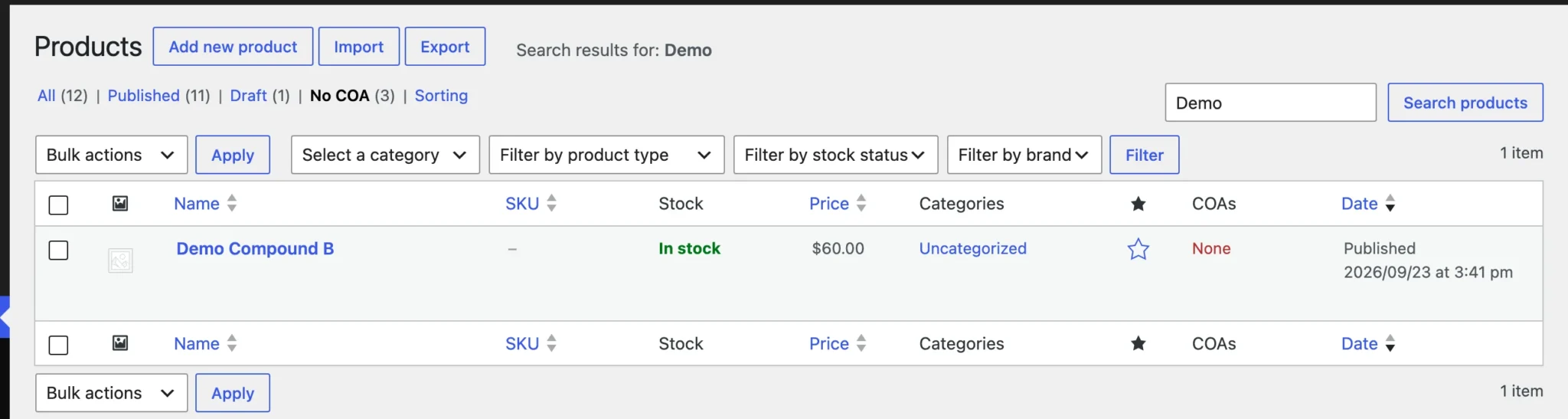
The Products list gains a COAs column and a No COA view of published products without a certificate.
Would rather not load new lots yourself? On stores we maintain, adding COAs as new lots arrive is part of our High-Risk Store Care plan, $750 a month, alongside staged updates, tested backups and a checkout test after every meaningful update.
QR code COA verification: lab codes vs. label codes
“QR verification” means two different things, and only one of them comes built into most plugins.
The lab’s QR code on the certificate
Many labs print a code on the certificate that opens their own verification page. Linking to it is the simplest verification you can offer. COA Vault does this: it reads the code from an uploaded certificate image (or you paste the link) and shows the shopper a link to the lab’s page.
Your own QR code on the product label
The code on your packaging opens a lookup page on your store for that batch. COA Vault makes no QR codes and has no lookup page. The documentation for Certificate of Analysis by WPRobo describes both, TraceBatch’s listing describes label codes, and otherwise it is a custom build. A good lookup page shows:
- the product, the size and the batch number exactly as printed on the label
- the lab name, the test date and the certificate itself
- a link to the lab’s own verification page, where the lab offers one
- a plain “not found” message for an unknown batch number, never the nearest match
- older batches clearly marked as older, so nobody mistakes history for the current lot
Printing is your side: getting the right code onto the right label is a packaging job, and it needs a check every time a lot changes.
Should COAs be public or gated?
Some operators, research peptide stores in particular, put COAs behind a login or an account-approval step to control who can download them. The trade-offs:
- Search visibility. Search engines will not index what sits behind a login.
- Outside access. Anyone outside your customer accounts who needs to see a certificate, such as a business partner, needs a way in. Decide how before they ask.
- Friction. Every gate costs you some buyers.
- The gate has to be real. Media Library files have public URLs, and COA Vault’s REST API lists COA data for published products to anyone, by design. Hiding a panel is not protecting the files. A true gate needs protected file storage and a closed API: custom work.
A COA checklist you can copy
- Every published product has a COA, and your “missing COA” count is zero.
- Each COA is tied to a batch number that matches the label.
- Sizes made in separate runs each show their own certificate.
- The lab name and test date are visible before anyone opens the file.
- The current batch is marked as current, and older batches are archived, not deleted.
- Verify links go to the lab’s own page, and someone has clicked each one.
- Dates are unambiguous. 06/04/2026 is not.
- If COAs are gated, the files and any API are gated too, not just the panel.
- Updating COAs is a named person’s job on the receiving checklist.
- The product page, the label and the product copy say the same thing.
COA display FAQ
Does WooCommerce have a built-in COA field?
No. WooCommerce has no field for showing a certificate or document on the product page, for products or for variations; its downloadable files are delivered after purchase, not shown on the page. Without a plugin, the options are a link in the product description, a custom product tab added with the woocommerce_product_tabs filter, or text in each variation’s description. Batch-level and per-variation COAs need a COA plugin or custom code.
Which WooCommerce COA plugin should I use?
There is no single best one; it depends on what you need beyond display. For order-level batch records, label QR codes and a verify-by-batch page, the documentation for Certificate of Analysis by WPRobo describes all three. COA Vault covers free per-variation COAs with links to the lab’s verify page, and Product Batch Numbers by WP Overnight covers batch and expiry inventory without certificate files. We built COA Vault for our own clients’ stores, so weigh that.
Will a COA plugin slow down product pages?
A well-built one adds little: a short list, a stylesheet and script, and one request when a shopper changes size. The weight is usually the certificate images, so serve resized images, not full-resolution scans. Measure on staging with your own theme and caching rather than trusting anyone’s claim, including ours.
Can COAs be moved from Shopify to WooCommerce?
Yes. The files move easily; the work is mapping each certificate to the right product, variation and batch, and redirecting every old URL. COA Vault’s REST API can take records from a migration script. Budget for this step, because it is usually larger than it looks.
Does showing a COA settle my store’s legal obligations?
No. A COA reports a lab’s results for one batch. It does not make a product approved, and a COA, a login gate or a research-use-only label does not settle a store’s legal status. Labeling, policies and claims are for your counsel to sign off.
The bottom line
A COA display is a small feature with a long tail. Choose the method for the catalog you will have in a year, not the one you have today.
Need COAs tied to lots and sizes, behind a real gate, or moved over from another platform? Send us a store brief. A paragraph is enough. We reply within one business day, and a fixed-scope proposal follows in writing before any work starts.
Disclaimer: Beenacle builds websites. We are not lawyers and nothing here is legal or regulatory advice; your counsel signs off on labeling, policies and claims.